Dashboard Widgets
The Dashboard Widgets in Tickera surface live event stats directly on the WordPress dashboard home — total tickets sold today, attendees expected, recent orders, top-selling events. Useful for getting a quick read on activity without diving into Tickera’s main screens, especially on launch day or during high-volume sales windows.
Once you install and activate Tickera, it automatically adds a dashboard widget to your WordPress admin area, giving you a quick snapshot of your ticketing activity without having to dig into reports or analytics. This widget is especially handy if you want to keep an eye on your sales and orders as soon as you log in.
Ticketing store at a glance
The Ticketing Store at a Glance widget offers an immediate overview of how your ticket store is performing. This widget displays the most relevant information right where you need it — your WordPress dashboard.
Here’s what you’ll find in this widget:
- Sales this month: Displays the total revenue generated from ticket sales for the current month, so you can track performance at a glance.
- Today’s earnings: A real-time indicator showing how much you’ve sold so far today — perfect for monitoring live sales activity during event promotions or on-sale days.
- Completed orders (last 30 days): Shows the total number of successfully completed orders in the past 30 days, giving you a sense of recent performance trends.
- Pending orders (last 30 days): Lists all orders that have been received but not yet completed — useful for quickly spotting issues with payment gateways or customer follow-ups.
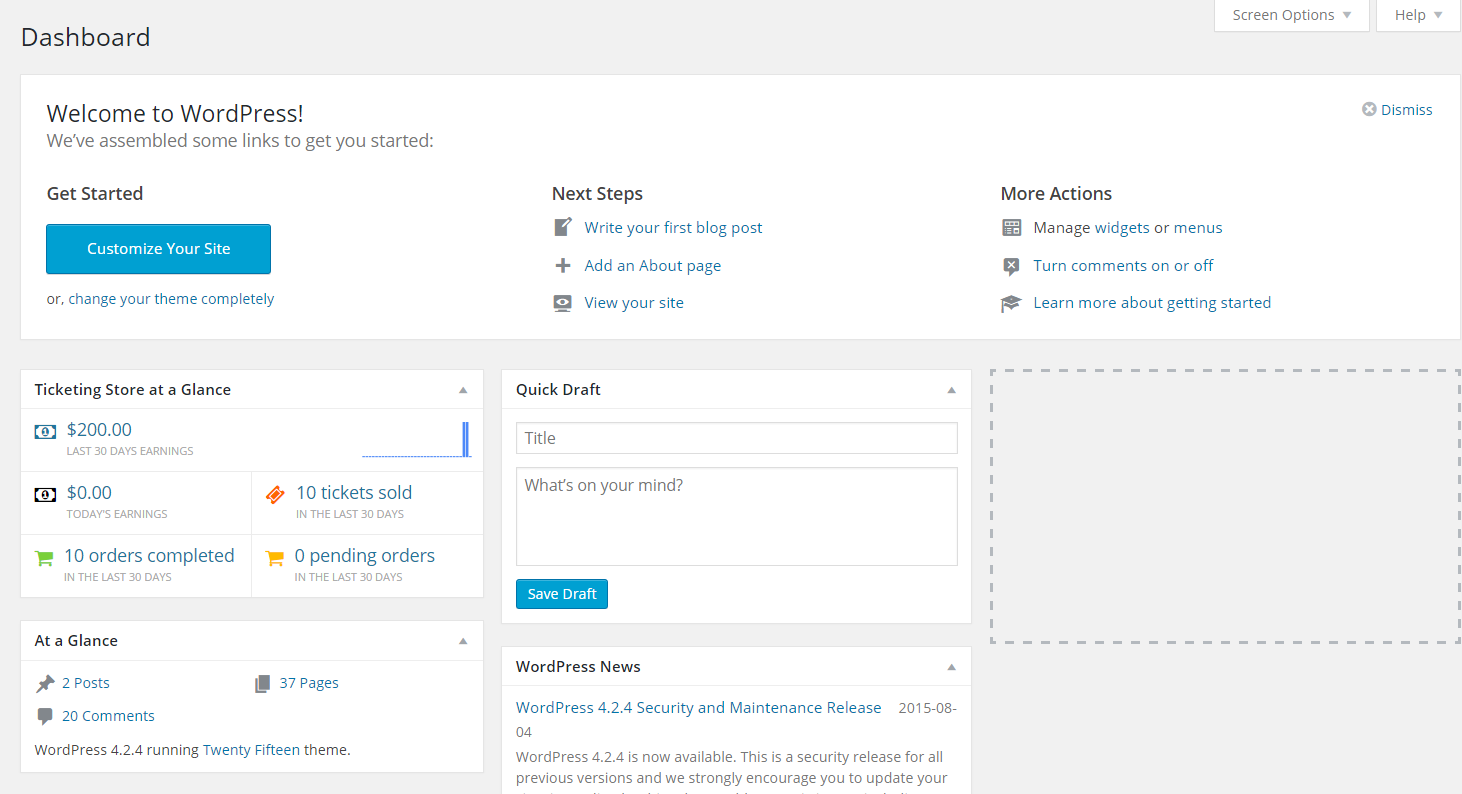
This widget updates automatically as new orders come in or statuses change, so you’ll always have a live overview of your store’s key metrics.
Note: The Ticketing Store at a Glance widget is only available when Tickera is running as a standalone system.
If you’re using Bridge for WooCommerce, this widget will not appear because WooCommerce takes over the order management system.
In that case, you can use WooCommerce’s own dashboard widgets for order and sales tracking instead.
You can learn more about WooCommerce dashboard widgets here.
.
Why it’s useful
While Tickera includes detailed reports (such as Export PDF and CSV Export add-on) and filtering tools elsewhere in the admin area, the dashboard widget serves as your quick daily snapshot — something you can check in seconds. It’s ideal for:
- Tracking ticket sales during busy event days
- Monitoring order flow after marketing campaigns or newsletter sends
- Spotting incomplete or pending orders that might need your attention
You can also rearrange or minimize this widget just like any other WordPress dashboard element, so it fits neatly into your preferred workspace layout.
Related questions
- Attendees and tickets
- Creating an event
- Dashboard takes too long to load
Was this article helpful?
Yes — great. No or partially? Tell us what was missing — we read every message and use it to improve these docs.