A season of events,
on one calendar.
A clean, professional responsive calendar for your Tickera events. Visitors scroll through the schedule, see what’s coming up, and click into the event — the way people expect to browse a calendar. Block or shortcode.
- A sleek, responsive calendar view of your Tickera events
- Visitors scroll through your schedule to see what’s coming up
- Tap any event in the calendar to land on its Tickera event page
- Add it to any page using a shortcode or block
Six things that turn a list
into a calendar people use.
Calendar view
Presents your events in a clean, easy-to-browse calendar layout — the format visitors already know how to read at a glance.
Event-aware
The calendar pulls events straight from Tickera — no manual entry, no duplicate listings. Add or edit an event in Tickera and it shows up.
See what’s coming up
Visitors scroll through your schedule to see upcoming events at a glance — the calendar gives a quick snapshot of dates and event details.
Clean, on-brand look
Displays events in a nicely styled, easy-to-browse calendar — designed to sit naturally on your event site.
Responsive
Looks great on all devices — the calendar adapts to your screen size so visitors can browse on phone or desktop.
Block or shortcode
Drop the block into any page, or paste the shortcode wherever you need it — embed your calendar anywhere on your site.
Drop it in, pick your options.
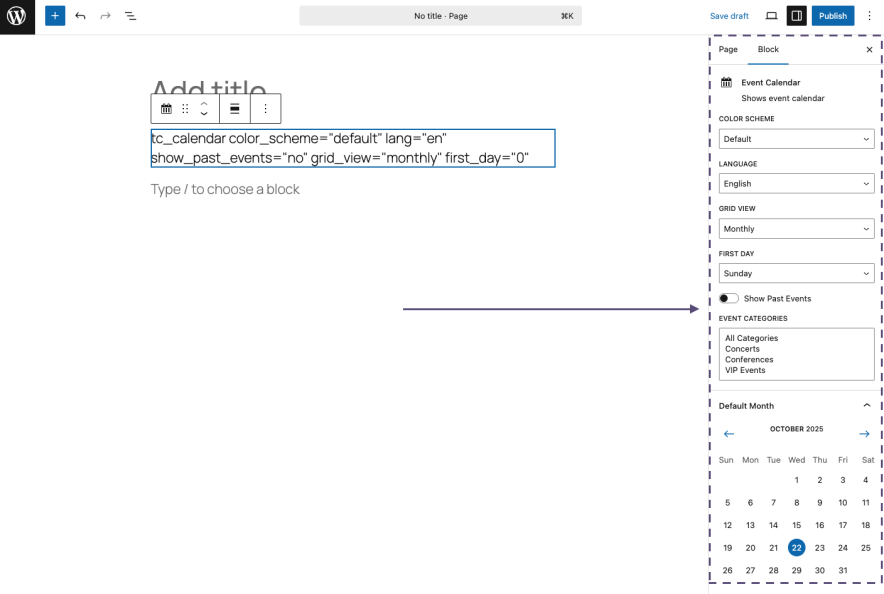
Add the Event Calendar block to any page, or paste the shortcode wherever you need it. The block exposes the calendar’s options in the editor so you can fit it to your page without touching templates.
- Block or shortcode insertion — drop into any page or post
- Pulls all Tickera events automatically — no duplicate setup
- Responsive layout — looks good on every device
From a list of events
to a calendar on your site.
Install
Activate the add-on.
Upload the plugin, hit activate. The Event Calendar block appears in the Gutenberg inserter; the shortcode is registered for everything else.
Embed
Drop the calendar in.
Add the block to any page — or paste the shortcode in a widget, template file, or custom post type. Configure the options to fit your page.
Browse
Visitors browse the schedule.
Visitors land on the page, scroll through the calendar, and click an event to land on the Tickera event page and check out.
Questions about
putting events on a calendar.
What about Events Listing — should I use both?
Can I show the calendar on multiple pages?
Will it match my theme?
Does it work on mobile?
What versions of Tickera does this work with?
Put your season
on a calendar people scan.
$39 a year. A responsive calendar for your Tickera events, ready to drop in via block or shortcode. 0% per-ticket commission, like every Tickera add-on. Or free with the Bundle.