Sell tickets the way
Europe actually pays.
In Belgium it’s Bancontact. In the Netherlands it’s iDEAL. Mollie ships those plus Credit Card, PayPal, SOFORT, paysafecard and other methods behind one PCI-compliant checkout. This add-on plugs Mollie straight into Tickera.
- Multiple European payment methods through one gateway — iDEAL, Bancontact, Credit Card, PayPal…
- PCI-compliant hosted checkout — you never touch card numbers
- Mollie’s fees go to Mollie. Tickera’s commission is still 0%, forever.
- Sandbox + live keys — test the full flow before going live
Six reasons Mollie is the
European checkout default.
iDEAL — the Dutch default
iDEAL is the way Dutch customers expect to pay online — from major banks like ING, ABN AMRO and Rabobank. Mollie ships it built in.
European method coverage
Belgium pays with Bancontact. Netherlands pays with iDEAL. Germany pays with SOFORT. Mollie covers these and other local methods behind one integration — check Mollie’s site for the current list per country.
PCI-compliant by design
The buyer enters card data on Mollie’s hosted checkout, not your site. You stay out of PCI scope — less liability, fewer compliance forms.
Tickets issued on payment
Mollie confirms the payment, Tickera issues the ticket, and the buyer gets the confirmation email — no manual order processing in the middle.
Familiar payment methods
Mollie shows your customers the methods they already trust — iDEAL for Dutch buyers, Bancontact for Belgian buyers, Credit Card, PayPal and more depending on what your Mollie account has enabled.
Transparent Mollie fees
Mollie publishes its fees publicly — no negotiated rates, no surprise “risk pricing.” Tickera adds nothing on top. Your buyer pays, Mollie takes a small fee, the rest is yours.
Paste your Mollie key. Pick your methods. Ship.
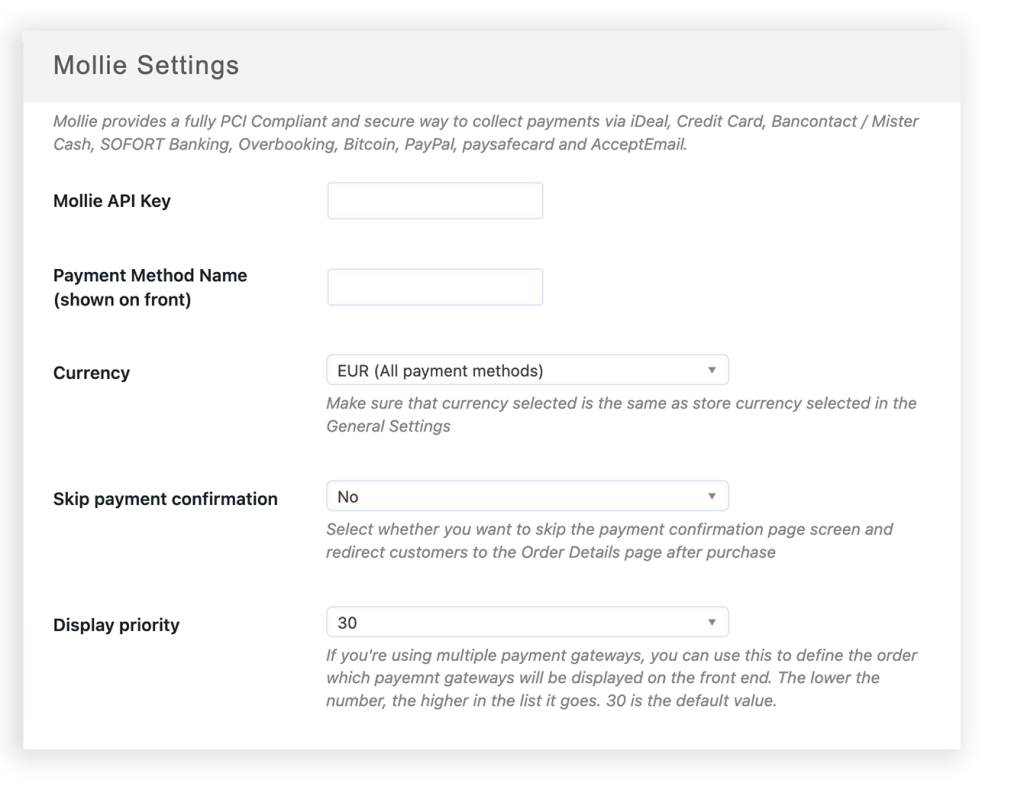
Activate the add-on and connect your Mollie account in the gateway settings. From then on, customers can pick their preferred Mollie payment method at checkout and are securely redirected to Mollie to complete the payment.
- Connect your Mollie account — one-time setup
- Customers pick their preferred Mollie payment method at checkout
- Secure redirect to Mollie or the buyer’s bank for payment completion
From sign-up
to first paid ticket in an hour.
Sign up
Open a Mollie account.
Head to mollie.com, register, verify your business. Pull your test API key from the dashboard — live keys arrive after KYC clears.
Connect
Paste the key into Tickera.
In the Tickera admin, open Payment Gateways → Mollie. Paste the key, enable the methods you want to offer. Run one test purchase in test mode. Verify the ticket lands in the buyer’s inbox.
Go live
Flip to live keys, sell tickets.
Once Mollie clears your account, swap the test key for a live one. Buyers now pick iDEAL, Bancontact, Credit Card or any enabled method. Mollie collects, Tickera issues the ticket.
Questions about
running Mollie behind Tickera.
Which payment methods does Mollie support?
Which countries does Mollie work in?
What does Mollie charge?
What about chargebacks and refunds?
Does it work with Bridge for WooCommerce?
What versions of Tickera does this work with?
Take iDEAL.
Take Bancontact. Take everything.
$59 a year. Unlimited tickets through Mollie’s European payment methods. 0% Tickera commission, like every add-on we ship. Or free with the Bundle.