PayTabs
PayTabs is a payment gateway focused on the Middle East, North Africa and emerging markets — strong support for local card schemes in Saudi Arabia, the UAE, Egypt, Jordan, Oman, Kuwait, Bahrain. Tickera’s PayTabs integration is the right pick for organizers in those regions who need a domestic processor for regional cards.
To use PayTabs payment gateway for selling Tickera tickets, you will first need to create a merchant account here.
Once you have finished creating your merchant account you can immediately head to Tickera to set it up as only your PayTabs username and password will be needed to set it up for use with Tickera.
So you just have to navigate to Tickera>Settings>Payment Gateways, check PayTabs icon and input your account information:
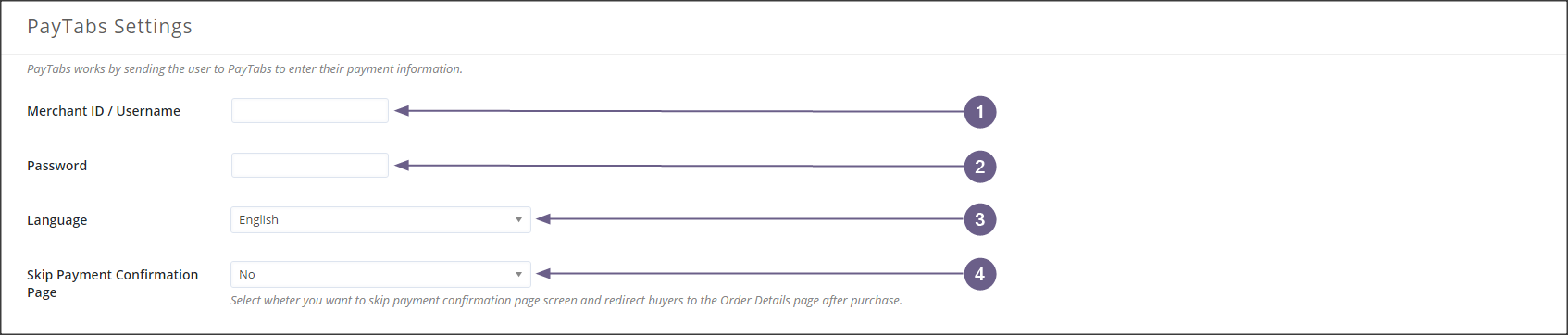
- Merchant ID / Username – enter your PayTabs username here
- Password – enter your PayTabs password here
- Language – select between English or Arabic languages
- Skip Payment Confirmation Page – select whether to skip payment confirmation page or not
Related questions
Was this article helpful?
Yes — great. No or partially? Tell us what was missing — we read every message and use it to improve these docs.