

Regenerate ticket code for existing tickets
Other Categories:
Tickera Account FAQ, Pre-sales FAQ, Tickera, Bridge for WooCommerce, Add-ons, Check-in Apps, FAQ & TroubleshootingRegenerate ticket code for existing tickets
By default, each ticket generated by Tickera receives a unique ticket code. That code is used to generate the QR code and barcode associated with the ticket and is the core element used during the check-in process.
In certain situations, administrators may need to invalidate an already issued ticket and generate a new ticket code for the same ticket instance.
This solution allows exactly that.
With this add-on activated, administrators can manually regenerate the ticket code for any individual ticket.
What this solution does
After activation, a Regenerate button becomes available for ticket instances inside the Orders area.
Depending on your setup, you can access it:
- By editing the order in Tickera -> Orders when using Tickera as a standalone
- By editing the order from WooCommerce -> Orders when using Tickera alongside WooCommerce and the Bridge for WooCommerce add-on
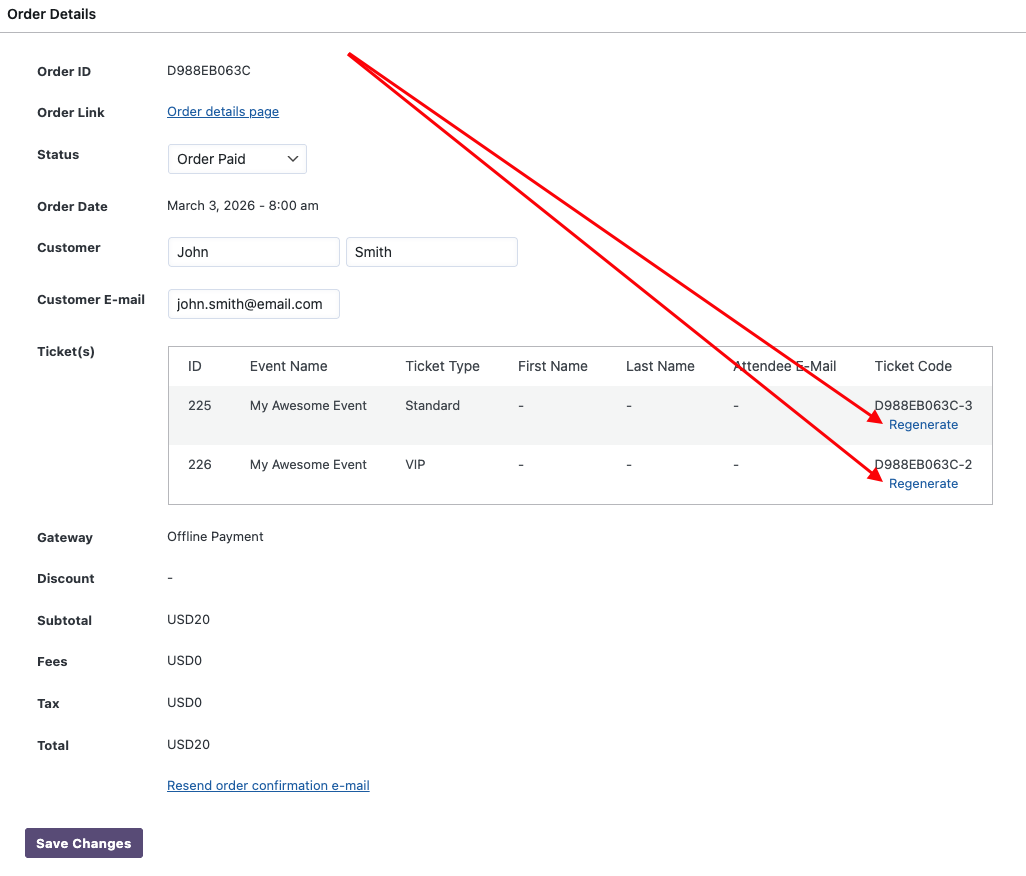
When the Regenerate button is clicked:
- A confirmation popup appears (to prevent accidental changes).
- After confirming, the ticket code is regenerated.
- The QR code and barcode are automatically updated to reflect the new ticket code.
The ticket remains associated with the same order and event, but its identifying code changes.
Important: previously sent tickets become invalid
This action immediately invalidates the previously generated ticket file.
Since QR codes and barcodes are based on the ticket code, once the code is regenerated previously downloaded ticket files will no longer be valid as previously issued barcodes and QR codes will fail at check-in.
After regenerating the ticket code, you must re-send the updated ticket to the customer. Failing to do so may result in customers arriving with an invalid ticket.
This is why the confirmation popup is included - to prevent accidental regeneration.
When would you use this?
Although not needed in everyday workflows, there are several legitimate scenarios where regenerating a ticket code can be useful.
Lost or publicly shared ticket
If a customer accidentally shares their ticket publicly (for example, posts a screenshot with a visible QR code), you may want to invalidate that ticket and issue a new one.
Instead of canceling the order entirely, you can regenerate the ticket code and re-send the updated ticket.
Suspected ticket duplication or fraud
If you suspect that a ticket code has been copied or duplicated, regenerating the code immediately invalidates the previous version.
This is especially useful in high-demand events where screenshots are sometimes circulated.
Manual corrections after operational mistakes
In rare cases where ticket files were mistakenly distributed to the wrong recipient, regenerating the ticket code ensures that only the newly issued version will work at the entrance.
What this solution does not do
- It does not create a new ticket.
- It does not duplicate tickets.
- It does not affect order totals or ticket quantities.
- It does not modify attendee information.
It only changes the ticket code for the selected ticket instance.
One more thing...
If security is a priority, this solution works especially well together with the Random ticket codes solution. That solution replaces the default ticket code structure with completely random values, making ticket codes significantly harder to predict or replicate. When combined, you gain both stronger code generation and the ability to invalidate and regenerate codes when needed.
If you regenerate multiple ticket codes - for example, across an entire event - you may also want to use the solution for re-sending emails to buyers and/or attendees for the whole event. This allows you to quickly distribute updated tickets in bulk rather than contacting customers one by one.
Together, these tools give you full control over ticket code security, distribution, and recovery when unexpected situations occur.