Membership, License usage and Upgrade
A single Tickera license covers everything you need to know about installation, upgrades, renewals and what each plan tier includes. Here are the answers to the questions we get asked the most often, in one place.
Can I use one Tickera license on multiple websites?
Yes. Buy a license once, install Tickera on as many websites as you want using the same license key. There are no domain limits, no site activation caps, no “deactivate the old install before activating the new one” friction. Run a network of event sites, run a staging copy alongside production, run a personal test site — all with the one license you already paid for.
Can I upgrade my license from Standard to Bundle, or Bundle to Lifetime?
Yes, and it’s fully automated with prorated pricing. The earlier in your current license year you upgrade, the smaller the prorated cost.
To upgrade:
- Go to the Tickera pricing page.
- Click Buy Now under the plan you want to move to.
- In the popup, click “Renewing or upgrading? Enter license key” and paste your existing key.
- The system calculates the prorated upgrade price based on how much time has passed since your original purchase.
- Proceed with checkout as usual.
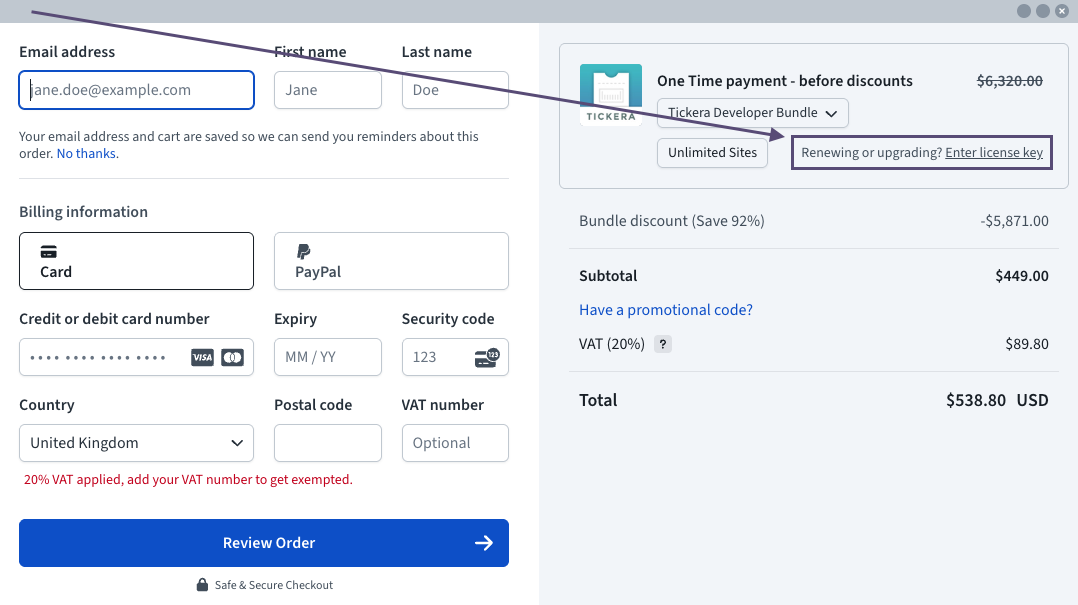
No support ticket, no manual approval, no waiting. As soon as the payment goes through, your license is upgraded and you can download the new version (and any newly-included add-ons) from your members area.
Can I upgrade from the free version to a paid license?
Yes, any time. Tickera’s free version (available on WordPress.org) is fully functional for selling tickets — but it doesn’t include add-ons, premium support, or the Checkinera check-in apps. When you’re ready, you can move to a paid license without losing any data:
- Purchase a Standard, Bundle or Lifetime license on the pricing page.
- Log in to your Tickera account and download the premium version of the plugin (plus any add-ons you plan to use).
- Deactivate and delete the free version on your site. (If it stays installed, it blocks premium features from activating — this step is non-negotiable.)
- Install and activate the premium version. Activate your license key in Tickera’s settings.
All your events, tickets, orders, attendees, settings and templates remain exactly as they were. Tickera stores everything in the WordPress database, and the database isn’t touched when you swap plugin versions. The premium upgrade is a code swap, not a data migration.
Do I need to renew my license?
It depends on the plan:
- Standard and Bundle licenses are annual subscriptions. They auto-renew through your payment method on file, and you’ll get reminder emails before each renewal so nothing surprises you.
- Lifetime licenses are one-time payments. They never expire and never need renewing.
If you cancel a Standard or Bundle subscription, your existing license keeps working until the end of the paid period. After that, the plugin doesn’t stop functioning — your events, tickets and sales continue — but you lose access to:
- Plugin and add-on updates
- Premium support
- The Checkinera check-in apps (Bundle includes Checkinera Lite; Lifetime includes all Checkinera apps)
You can re-subscribe at any time. If you let a Standard or Bundle license lapse and want to come back later, you’ll need to purchase a fresh license at full price (no discounted renewal once the license is fully expired).
Do I get free updates?
Yes — for the full duration your license is active, you receive every plugin update, every add-on update, every check-in app update, free of charge. Tickera ships updates regularly (bugfixes, new features, gateway integrations, WordPress and PHP compatibility, security patches). All of them install through the standard WordPress update screen, no manual download needed once your license is activated.
Which add-ons does each plan include?
| Plan | Add-ons included |
|---|---|
| Free | None (core plugin only) |
| Standard | None (core plugin + premium support + updates) |
| Bundle | All Tickera add-ons except the Checkinera check-in apps |
| Lifetime | All add-ons including Checkinera check-in apps, forever |
Add-ons can also be bought individually if you only need one or two. Every add-on works with every Tickera version, including the free one — so if you only need, say, the Seating Charts add-on and don’t want a full Bundle license, you can buy it standalone.
See the full add-ons catalogue for what each one does.
What about support?
Yes, paid licenses include premium support. Standard, Bundle and Lifetime licensees get access to our support team for any Tickera-related question — setup, configuration, gateway issues, theme integration, debugging. Free-version users can use the WordPress.org plugin support forum (volunteer/community-driven, not guaranteed response).
Where are the terms and refund policy?
Our full terms and refund policy are on the Terms & Conditions page. The short version: 30-day refund window for new license purchases if Tickera doesn’t fit your needs.
Related questions
Was this article helpful?
Yes — great. No or partially? Tell us what was missing — we read every message and use it to improve these docs.