Custom Dashboard Widget (year-to-date)
A custom dashboard widget recipe for displaying year-to-date sales metrics on the WordPress dashboard — total revenue YTD, tickets sold YTD, top-selling events YTD. Useful for organizations that need quick yearly overviews without exporting to a spreadsheet.
Tickera’s default dashboard widget shows your earnings and orders for the last 30 days. That quick overview is useful for daily monitoring, but many organizers also want a broader picture—something that reflects how the entire year is unfolding, not just the recent month.
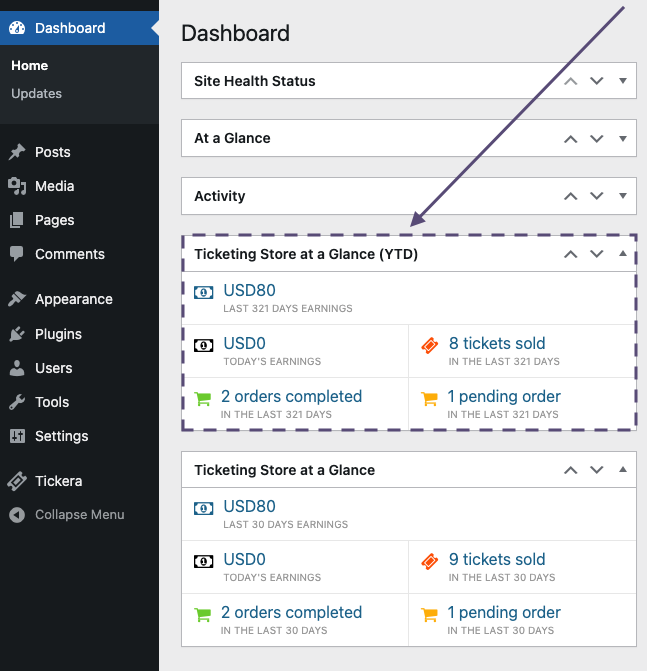
This custom year-to-date dashboard widget add-on adds a new dashboard widget that displays year-to-date (YTD) sales and order totals. It doesn’t replace the existing 30-day widget; it simply sits next to it and gives you a wider perspective on your overall progress throughout the current calendar year.
Install the add-on like any other WordPress plugin. It works only with standalone Tickera installations, just like the default dashboard widget. Once activated, a brand-new year-to-date dashboard widget will appear on your WordPress dashboard displaying cumulative earnings and order counts for the year.
If you need even deeper reporting or want to export your sales data, take a look at Tickera’s CSV Export add-on, which allows you to export detailed order and ticket information for custom analysis.
And if you’re interested in displaying your ticket sale statistics on the front end of your website, you may also like our solution post.
Related
Was this article helpful?
Yes — great. No or partially? Tell us what was missing — we read every message and use it to improve these docs.