– Check-ins count per API key
A customization for tracking check-ins per API key — useful for multi-gate events where you want to see how many check-ins each staff member’s app accounted for, for accountability, attribution, or staff-rota analytics.
If your event has multiple entrances or checkpoints, it’s common to generate a separate API key for each device or gate. This keeps your setup organized and also allows you to review traffic patterns after the event—helping you understand which entrance handled the most attendees and where additional staff or devices may be needed next time.
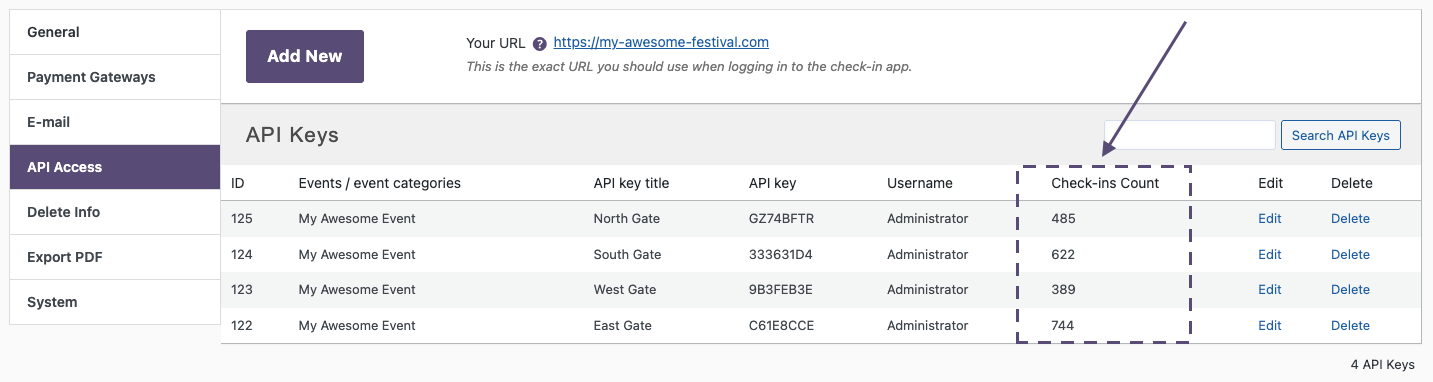
This small add-on makes that workflow much easier by adding a new column to the Tickera Settings -> API Access table. The new column displays the total number of check-ins performed with each API key, giving you immediate insight into how busy each gate or scanning device was during the event.
The add-on installs like any other WordPress plugin. It works automatically after activation and is compatible with both standalone Tickera installations and with Tickera running alongside WooCommerce via Bridge for WooCommerce.
These kinds of metrics become especially valuable when you’re optimizing your on-site workflow. If you’re refining entrance flow, staffing, or planning for future events, you may find the following guides helpful:
- Maximizing efficiency of Checkinera – practical, real-world tips for getting the most out of your scanning setup
- Ticket check-in at the door – a step-by-step look at what to expect and how to prepare for a smooth entrance experience
- How to utilize CSV Export like a pro – explains how to export check-in data (including per-API-key information) if you want to analyze or archive it outside WordPress
Related
Was this article helpful?
Yes — great. No or partially? Tell us what was missing — we read every message and use it to improve these docs.