Your speakers,
the headline of your event.
Speakers are why people buy the ticket. This add-on adds a Speaker custom post type with photo, title, bio, website and social links — then connects each speaker to your Tickera events. Show them on the event page, in a grid, a list, a slider, or filtered by track.
- Photo, name, title, bio, website, social profiles — per speaker
- Four display styles — slider, grid, list, filtered by track
- Link speakers to specific Tickera events — show up on the event page
- Inherits theme colors — matches your site without a single line of CSS
Six things you need
to manage real speaker lineups.
Full speaker profile
Photo, name, title, biography, website, social profiles. Every field you’d expect on a real conference site — nothing more, nothing missing.
Linked to events
Each speaker connects to one or more Tickera events. The event page shows its lineup automatically. No copy-pasting the same bio across 5 pages.
Grid, list, slider
Same data, different layouts. Grid for a packed lineup, list for a long agenda, slider for the homepage. Pick per page.
Filter by track
Multi-track conference? Tag speakers with a track and the display block lets visitors filter — show only the AI track, or only the design track.
Social proof, built in
Facebook, LinkedIn, X — pre-built icon links. Audiences explore a speaker’s work, follow them online, connect after the event.
Inherits your theme
Speaker cards pick up your theme’s colors, fonts, and accent. The lineup looks like it was built for your site — not bolted on.
One screen per speaker. Update once, show everywhere.
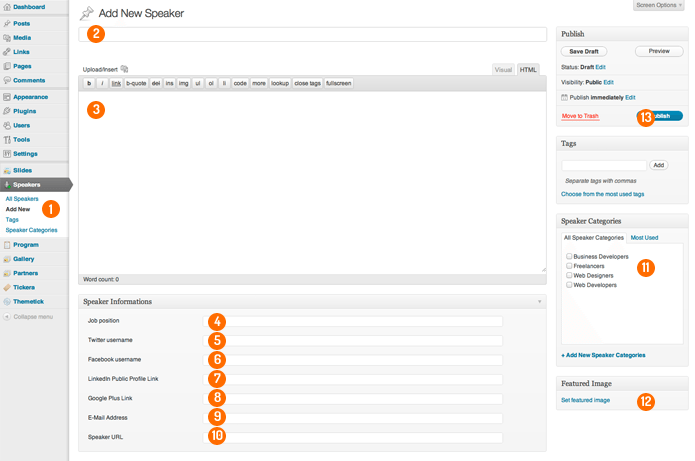
Every speaker is a custom post in WordPress. Edit photo, name, title, biography, website, socials in one familiar editor. The link to events is a dropdown on the same screen — pick which events this speaker appears at, save, done.
- WordPress-native admin — no custom UI to learn
- Update a bio once — it updates across every event page
- Reorder, draft, schedule — standard WP post controls apply
From empty CPT
to a full lineup page.
Add
Create speaker profiles.
Open Speakers → Add New. Drop a photo, paste the bio, set title, link the website, add Facebook/LinkedIn/X URLs. Save. Repeat for every speaker.
Link
Attach speakers to events.
On each speaker (or each event), pick which Tickera events the speaker appears at. The relationship is bidirectional — works from either side.
Display
Drop the block on the page.
Add the Speakers display block to your event page, homepage, agenda — wherever. Choose layout (grid/list/slider), optional track filter, hit publish.
Questions about
running a speaker lineup.
Can the same speaker appear at multiple events?
Which social networks can I link?
Can I filter speakers by track or topic?
Does it auto-show on the event page?
Will it match my theme’s look?
What versions of Tickera does this work with?
Give your speakers
the spotlight they signed up for.
$29 a year. Unlimited speakers, unlimited events, four display layouts. 0% per-ticket commission, like every Tickera add-on. Or free with the Bundle.